May 14, 2017

Using Bootstrap Daterange Picker

Jquery Bootstrap Daterange Picker

Using Bootstrap daterange picker. Hello.., on this occasion, I want to share tutorials using date range picker in your web application. This starts when I search for jquery related daterange picker which I will use as data in my database. 

If you plan will require input data in terms of time (date and time or both) then this jquery you should try. All information related to the use of this component has been described on the  website and its use is not too difficult. Date Range Picker relies on Bootstrap, jQuery and Moment.js. So don't forget to include the required scripts and stylesheet in your page.

The following is an example of using the date range picker for bootstrap.

<html xmlns="http://www.w3.org/1999/xhtml">
<head>
<meta http-equiv="Content-Type" content="text/html; charset=utf-8" />
<meta name="viewport" content="width=device-width,initial-scale=1,maximum-scale=1,user-scalable=no" />
<title>PHP Search Mysql data</title>

    <!-- Bootstrap Core CSS -->
    <link href="bootstrap/css/bootstrap.min.css" rel="stylesheet">
     <!-- jQuery -->
    <script src="bootstrap/js/jquery.js"></script>
    <!-- Bootstrap Core JavaScript -->
    <script src="bootstrap/js/bootstrap.min.js"></script>
 <!-- Date Range Picker -->
 <link href="daterangepicker/daterangepicker.css" rel="stylesheet">
 <script src="daterangepicker/moment.js"></script>
 
</head>

<body>

<div class="navbar navbar-default navbar-static-top" role="navigation">
 <div class="container">
            
        <div class="navbar-header">
   <a class="navbar-brand" href="http://coding-cheese.blogspot.com/">Coding Cheese</a>
  </div>
   <ul class="nav navbar-nav">
    <li class="dropdown">
   <a class="dropdown-toggle" data-toggle="dropdown" href="#">Page 1
   <span class="caret"></span></a>
   <ul class="dropdown-menu">
     <li><a href="#">Page 1-1</a></li>
     <li><a href="#">Page 1-2</a></li>
     <li><a href="#">Page 1-3</a></li>
   </ul>
    </li>
    <li><a href="#">Page 2</a></li>
    <li><a href="#">Page 3</a></li>
  </ul>
            
  </div>

</div>

<div class="container">
<form class="form-horizontal" method="post" enctype="multipart/form-data">
 <fieldset>
  <div id="legend">
   <legend class=""><i class="glyphicon glyphicon-plus"></i>&nbsp; Add Data</legend>
  </div>  
  <div class="form-group">
    <label class="col-md-4 control-label" for="fullname">Full Name</label>  
    <div class="col-md-6">
    <input id="fullname" name="fullname" placeholder="Full Name" class="form-control input-md" required="" type="text" required >
    </div>
  </div>
  <div class="form-group">
    <label class="col-md-4 control-label" for="email">Email</label>  
    <div class="col-md-6">
    <input id="email" name="email" placeholder="Email" class="form-control input-md" required="" type="email" required >
    </div>
  </div>
  <div class="form-group">
    <label class="col-md-4 control-label" for="schedule">Schedule</label>  
    <div class="col-md-6">
    <input id="schedule" name="schedule" placeholder="Schedule" class="form-control input-md" type="text" required >
    </div>
  </div>
  <div class="form-group">
    <label class="col-md-4 control-label" for="jobdesk">Jobdesk</label>  
    <div class="col-md-6">
   <select id="jobdesk" name="jobdesk" class="form-control" required >
    <option value="Animation Design">Animation Design</option>
    <option value="Application Testing">Application Testing</option>
    <option value="Hardware Maintenance">Hardware Maintenance</option>
    <option value="Network Maintenance">Network Maintenance</option>
    <option value="Quality Control">Quality Control</option>
    <option value="Developt Application">Developt Application</option>
   </select>
    </div>
  </div>
  
  <div class="form-group">
    <label class="col-md-4 control-label" for="add_data"></label>
    <div class="col-md-4">
   <button id="add_data" name="add_data" class="btn btn-success">Add</button>
    </div>
  </div>
  
 </fieldset> 
<form>
</div>

<script src="daterangepicker/daterangepicker.js"></script>
<script type="text/javascript">
 $(document).ready(function () {
  $("#schedule").daterangepicker({ //date range picker
   "drops": "down",
   locale: {
    format: 'DD/MM/YYYY'
   }
  });
    });
</script>

</body>
</html>
jQuery Bootstrap date range picker
For the complete source code (with sql file) you can get it at this link below:
Read More

Apr 24, 2017

Auto Complete Search Mysql-Php then Fill Another Text Input

Auto Complete Search Mysql

Auto Complete Search Mysql-Php. I am having difficulty in making this way. But ultimately everything can be resolved and I will share it for you... 😊

Desain
I have data form like this:
Auto Complete Search Mysql

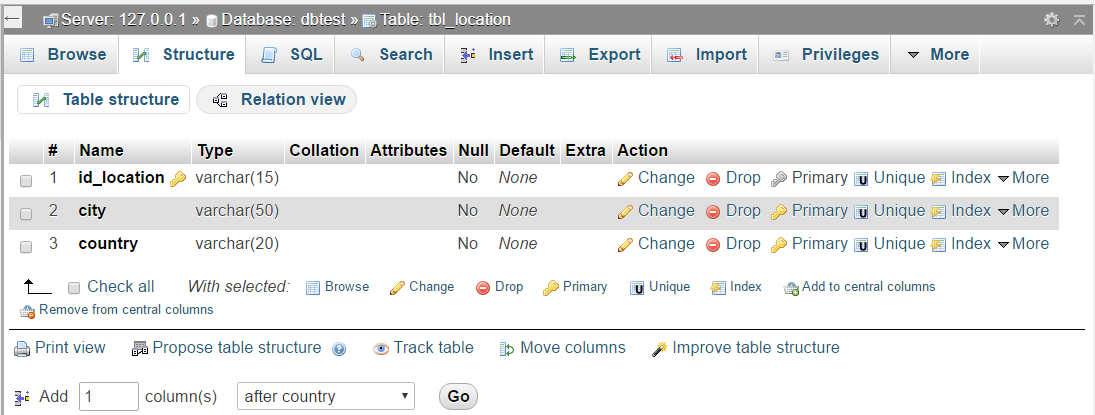
Because I already have city and country data, I want to use this auto complete search method to fill the city and country text field.
Auto Complete Search Mysql


Database
Create two table then relate both (example: tbl_members and tbl_location)
Search data php-mysql

Search data php-mysql

Search data php-mysql

Application
dbconfig.php => connector database
<?php
$database_host = "localhost";
$database_user = "root"; //your db username
$database_password = ""; //your db password 
$database_name = "dbtest"; //your database

try{
$connect_db = new PDO("mysql:host={$database_host};dbname={$database_name}",$database_user,$database_password);
$connect_db->setAttribute(PDO::ATTR_ERRMODE, PDO::ERRMODE_EXCEPTION);
}
catch(PDOException $e){
echo $e->getMessage();
}
include_once 'class.view.php';
$view = new view($connect_db);
?>

class.view.php => display data to index.php
<?php
class view
{
 private $db;
 function __construct($connect_db){
  $this->db = $connect_db;
 }

 public function dataview($query){
  $stmt = $this->db->prepare($query);
        $stmt->execute();
        if($stmt->rowCount()>0){
   while($row=$stmt->fetch(PDO::FETCH_ASSOC)){ ?>
    <tr>
     <td><?php print($row['id_member']); ?></td>
     <td><?php print($row['full_name']); ?></td>
     <td><?php print($row['email']); ?></td>
     <td><?php print($row['position']); ?></td>
     <td><?php print($row['city']); ?></td>
     <td><?php print($row['country']); ?></td>
    </tr><?php
    } ?>
  <?php
  }else{
   ?>
            <tr><td colspan="16">No Data Found ...</td></tr>
            <?php
  }
 }
}

auto_search.php => load data from tbl_location
<?php

 require_once 'dbconfig.php';

 $keyword = trim($_REQUEST['term']); // keyword on input city

 $sugg_json = array();    // this is for displaying json data as a autosearch suggestion
 $data_json = array();     // this is for stroring mysql results in json string
 

 $keyword = preg_replace('/\s+/', ' ', $keyword); // it will replace multiple spaces from the input.

 $query = 'SELECT id_location, city, country FROM tbl_location WHERE city LIKE :term';
 
 $stmt = $connect_db->prepare( $query );
 $stmt->execute(array(':term'=>"%$keyword%"));
 
 if ( $stmt->rowCount()>0 ) {
  
  while($rowResult = $stmt->fetch(PDO::FETCH_ASSOC)) {
      $data_json["id"] = $rowResult['id_location'];
      $data_json["value"] = $rowResult['city'];
      $data_json["label"] = $rowResult['city'];
   $data_json["country"] = $rowResult['country'];
      array_push($sugg_json, $data_json);
  }
  
 } else {
     $data_json["id"] = "";
     $data_json["value"] = "";
     $data_json["label"] = "";
  $data_json["country"] = "";
     array_push($sugg_json, $data_json);
 }
 
 $dataOutput = json_encode($sugg_json, JSON_UNESCAPED_SLASHES); 
 print $dataOutput;

index.php =>In this file there are 3 main parts
data form for add data to database
 <form class="form-horizontal" action="add_data.php" method="post">
 <fieldset>
 <!-- Form Name -->
 <legend align="right">Add Data Here</legend>
 <div class="col-md-6">
  <!-- Text input-->
  <div class="form-group">
   <label class="col-md-4 control-label" for="full_name">Full Name</label>  
   <div class="col-md-8">
   <input id="full_name" name="full_name" placeholder="Full Name" class="form-control input-md" required="" type="text">
   <span class="help-block"> </span>  
   </div>
  </div>

  <!-- Text input-->
  <div class="form-group">
   <label class="col-md-4 control-label" for="email">Email</label>  
   <div class="col-md-8">
   <input id="email" name="email" placeholder="Email" class="form-control input-md" required="" type="text">
   <span class="help-block"> </span>  
   </div>
  </div>

  <!-- Text input-->
  <div class="form-group">
   <label class="col-md-4 control-label" for="position">Position</label>  
   <div class="col-md-8">
   <input id="position" name="position" placeholder="Position" class="form-control input-md" required="" type="text">
   <span class="help-block"> </span>  
   </div>
  </div>
  
 </div>
 <div class="col-md-6">
  <!-- Text input-->
  <input id="id_location" name="id_location" type="hidden">
  <div class="form-group">
   <label class="col-md-4 control-label" for="city">City</label>  
   <div class="col-md-8">
   <input id="city" name="city" placeholder="City" class="form-control input-md" required="" type="text">
   <span class="help-block"> </span>  
   </div>
  </div>

  <!-- Text input-->
  <div class="form-group">
   <label class="col-md-4 control-label" for="country">Country</label>  
   <div class="col-md-8">
   <input id="country" name="country" placeholder="Country" class="form-control input-md" required="" type="text">
   <span class="help-block"> </span>  
   </div>
  </div>
  <div class="form-group" >
   <div class="col-md-8 col-md-offset-4" align="right">
    <button type="submit" name="btn_add" class="btn btn-sm btn-info"><i class="glyphicon glyphicon-plus"></i> &nbsp; Add</button>
   </div>
   
  </div>
 </div>
 
 </fieldset>
</form>

Display data => this part to display data from tbl_members and tbl_location with JOIN query
<div class="row">
 <table class="table table-bordered table-hover">   
  <thead class="thead-default">  
   <tr>
    <th class="col-md-1"><center> #</center></th>
    <th class="col-md-3"><center> Name</center></th>
    <th class="col-md-2"><center> Email</center></th>
    <th class="col-md-2"><center> Position </center></th>
    <th class="col-md-2"><center> City </center></th>
    <th class="col-md-2"><center> Country </center></th>
   </tr>
  </thead>
  <?php
   require_once 'dbconfig.php';
   
   $query = "SELECT tbl_members.id_member, tbl_members.full_name, tbl_members.email, tbl_members.position, tbl_location.city, tbl_location.country
       FROM tbl_members INNER JOIN tbl_location ON tbl_members.id_location=tbl_location.id_location"; 
    
   $view->dataview($query); 
  ?>
 </table> 
 <br>
</div>

Auto search (jquery)=>load data from auto_search.php process. this parts need some libraries (jquery UI). you can download it or load from this sources

<link rel="stylesheet" href="http://code.jquery.com/ui/1.12.1/themes/base/jquery-ui.css">
<script src="https://code.jquery.com/ui/1.12.1/jquery-ui.js"></script>


<script>
$(document).ready(function(){
 
 $('#city').autocomplete({
     source: "auto_search.php",
     minLength: 2,
     select: function(event, ui) {
         var id = ui.item.id;
   var city = ui.item.value;
   var country = ui.item.country;
         if (id != '') {
             $("#city").val(city);
    $("#country").val(country);
    $("#id_location").val(id);
         }
     },
     open: function(event, ui) {
         $(".ui-autocomplete").css("z-index", 1000)
     },
    
 }) 
});
</script>

add_data.php =>add data to the database. There is a section to handling if the city we write in city text field has not been recorded on tbl_location. Maybe I'll explain if anyone asks about it.

<?php

 error_reporting( ~E_NOTICE ); // avoid notice
 
 require_once 'dbconfig.php';
 
 if(isset($_POST['btn_add']))
 {
  $full_name = $_POST['full_name'];// user name
  $email = $_POST['email'];
  $position = $_POST['position'];
  $id_location = $_POST['id_location'];
  $city = $_POST['city'];
  $country = $_POST['country'];
  
  if ($id_location!=""){
   $query ="INSERT INTO tbl_members(full_name, email, position, id_location) 
            VALUES(:full_name, :email, :position, :id_location)"; 
      
   $stmt = $connect_db->prepare($query);
   $stmt->bindParam(':full_name',$full_name);
   $stmt->bindParam(':email',$email);
   $stmt->bindParam(':position',$position);
   $stmt->bindParam('id_location',$id_location);
   
   if($stmt->execute())
   {
    echo ("<SCRIPT LANGUAGE='JavaScript'>
       window.alert('Succesfully Updated')
       window.location.href='index.php';
       </SCRIPT>"); 
    header("location:index.php");    
    exit();
   }
   else
   { 
    echo ("<SCRIPT LANGUAGE='JavaScript'>
       window.alert('Error Insert Data')
       window.location.href='index.php';
       </SCRIPT>");
    exit();
   }
  }else{
   $id_location=time();
   $query ="INSERT INTO tbl_members(full_name, email, position, id_location) 
            VALUES(:full_name, :email, :position, :id_location)"; 
   $stmt = $connect_db->prepare($query);
   $stmt->bindParam(':full_name',$full_name);
   $stmt->bindParam(':email',$email);
   $stmt->bindParam(':position',$position);
   $stmt->bindParam(':id_location',$id_location);
   
   if($stmt->execute()){
    $query ="INSERT INTO tbl_location(id_location, city, country) VALUES(:id_location, :city, :country)"; 
    $stmt = $connect_db->prepare($query);
    $stmt->bindParam(':id_location',$id_location);
    $stmt->bindParam(':city',$city);
    $stmt->bindParam(':country',$country);
    if($stmt->execute())
    {
     echo ("<SCRIPT LANGUAGE='JavaScript'>
       window.alert('Succesfully Updated')
       window.location.href='index.php';
       </SCRIPT>");
     exit();
    }
    else
    {
     echo ("<SCRIPT LANGUAGE='JavaScript'>
       window.alert('Succesfully Updated')
       window.location.href='index.php';
       </SCRIPT>");
     exit();
     
    } 
   }else{
    echo ("<SCRIPT LANGUAGE='JavaScript'>
       window.alert('Succesfully Updated')
       window.location.href='index.php';
       </SCRIPT>");
    exit();
   }
   
   
  }
   
 }
?>

Result
Auto Complete Search Mysql-Php

For the complete source code (and sql file) you can get it at this link below:

Read More

Apr 14, 2017

Simple Search Feature with PHP and MySQL


Simple Search Feature with PHP and MySQL. Hello, in this post I would like to explain about implementation "search" sql query in your web application.  Another thing to note in this activity is a connection to the data base, displaying data, and search data. To access the data base I using  PDO method (I just like this method 😊 ).

Data Base
Create data base and table. I have sample like this:
data base: dbtest, table:tbl_members
CREATE TABLE `tbl_members` (
  `user_id` int(5) NOT NULL,
  `first_name` varchar(25) NOT NULL,
  `last_name` varchar(25) NOT NULL,
  `email` varchar(50) NOT NULL,
  `position` varchar(25) NOT NULL,
  `office` varchar(25) NOT NULL
)
or you can use sql file which I attach on download link.

DB Connection (dbconfig.php)
configuration to connect data base.
<?php
$DB_host = "localhost";
$DB_user = "root"; //your db username
$DB_pass = ""; //your db password 
$DB_name = "dbtest"; //your database

try{
$DB_con = new PDO("mysql:host={$DB_host};dbname={$DB_name}",$DB_user,$DB_pass);
$DB_con->setAttribute(PDO::ATTR_ERRMODE, PDO::ERRMODE_EXCEPTION);
}
catch(PDOException $e){
echo $e->getMessage();
}
include_once 'class.view.php';
$view = new view($DB_con);
?>

Displaying data 
1. class.view.php
to process instructions from query (in index.php)
<?php
class view{
 private $db;
 function __construct($DB_con){
  $this->db = $DB_con;
 }

 public function dataview($query){
   $stmt = $this->db->prepare($query);
   $stmt->execute();
   if($stmt->rowCount()>0){
      while($row=$stmt->fetch(PDO::FETCH_ASSOC)){ ?>
       <tr>
        <td><?php print($row['user_id']); ?></td>
        <td><?php print($row['first_name']); ?></td>
        <td><?php print($row['last_name']); ?></td>
        <td><?php print($row['email']); ?></td>
        <td><?php print($row['position']); ?></td>
        <td><?php print($row['office']); ?></td>
       </tr><?php
      } ?>
      <?php
   }else{
     ?>
      <tr><td colspan="16">No Data Found ...</td></tr>
     <?php
   }
 }
}

2. index.php
Displaying data
<div class="container">
 <div class="row">
  <form action="index.php" method="post">
   <div class="col-md-3 col-md-offset-8">
    <input type="text" name="search" class="form-control" placeholder="Enter First Name/Last Name">
   </div>
   <div class="col-md-1">
    <button class="btn btn-sm btn-info"><i class="glyphicon glyphicon-search"></i> &nbsp; Search</button>
   </div>
  </form>
 </div>
 <br>
 <div class="row">
  <table class="table table-bordered table-hover">          
   <tr>
    <th class="col-md-1"><center> Id</center></th>
    <th class="col-md-2"><center> First Name</center></th>
    <th class="col-md-2"><center> Last Name </center></th>
    <th class="col-md-3"><center> Email</center></th>
    <th class="col-md-2"><center> Position </center></th>
    <th class="col-md-2"><center> Office </center></th>
   </tr>
  <?php
   require_once 'dbconfig.php';
   $query = "SELECT * FROM tbl_members"; //show all data
   if(isset($_POST['search'])){ //botton search clicked
    $keyword=$_POST['search'];
    $query = "SELECT * FROM tbl_members 
        WHERE first_name like '%$keyword%' 
        OR last_name like '%$keyword%'"; //search
   }
   
   $view->dataview($query); //view data
  ?>
  </table> 
  <br>
 </div>
</div>

Seacrh data mysql php
The following is the part where the query that displays all the data is changed into a query to display the data sought.
<?php
 require_once 'dbconfig.php';
 $query = "SELECT * FROM tbl_members"; //show all data
 if(isset($_POST['search'])){ //botton search clicked
  $keyword=$_POST['search'];
  $query = "SELECT * FROM tbl_members 
      WHERE first_name like '%$keyword%' 
      OR last_name like '%$keyword%'"; //search
 }
 
 $view->dataview($query); //view data
?>

Result
Query Search data mysql php

For the complete source code you can get it at this link below:
Read More

Jan 20, 2017

Trigger Bootstrap Modal with Java Script / PHP Code

Trigger Bootstrap Modal with Java Script / PHP Code

Trigger Bootstrap Modal with Java Script / PHP Code- Hello readers, today I would like explain about how to create bootstrap modal controller from java script/php. Some things will make us to use this method, such as error handling, alerts (success, warning, etc), and input form that uses data stored in java script or php. This following is examples I use in error handling in Flat Portfolio Login Template 

Flow 
error handling with Bootsrap Modal

if username or password not right, check-login.php will be send the error message to login page. 
error handling with Bootsrap Modal

then after  login page receive error massage , we have to get the message to be used as a trigger in displaying the modals. this code is part to call the modal (errModal)
 <?php
 if (isset($_GET['error'])) : ?>
 <!-- open modal-->
 <script type="text/javascript">
     $(window).load(function(){
       $('#errModal').modal({
          show: true
       });
     });
 </script>
 <?php endif;?>


<!-- Modal -->
  <div class="modal fade" id="errModal" role="dialog">
    <div class="modal-dialog">
    
      <!-- Modal content-->
      <div class="modal-content">
        <div class="modal-header">
          <button type="button" class="close" data-dismiss="modal">&times;</button>
          <h4 class="modal-title">Error</h4>
        </div>
        <div class="modal-body">
          <p>You have entered an invalid login </p>
        </div>
        <div class="modal-footer">
          <button type="button" class="btn btn-default" data-dismiss="modal"> Close </button>
        </div>
      </div>
      
    </div>
  </div>

Don't forget to include  latest jquery lib . because the basic of this function is located in javascript.
Ok, thats all for the explanation. If you have a question, feel free to comment here!


Read More